

The links you've sent that nobody has claimed yet are listed in one place, so you always know what's out there.
Finding it
Settings → Shared links.
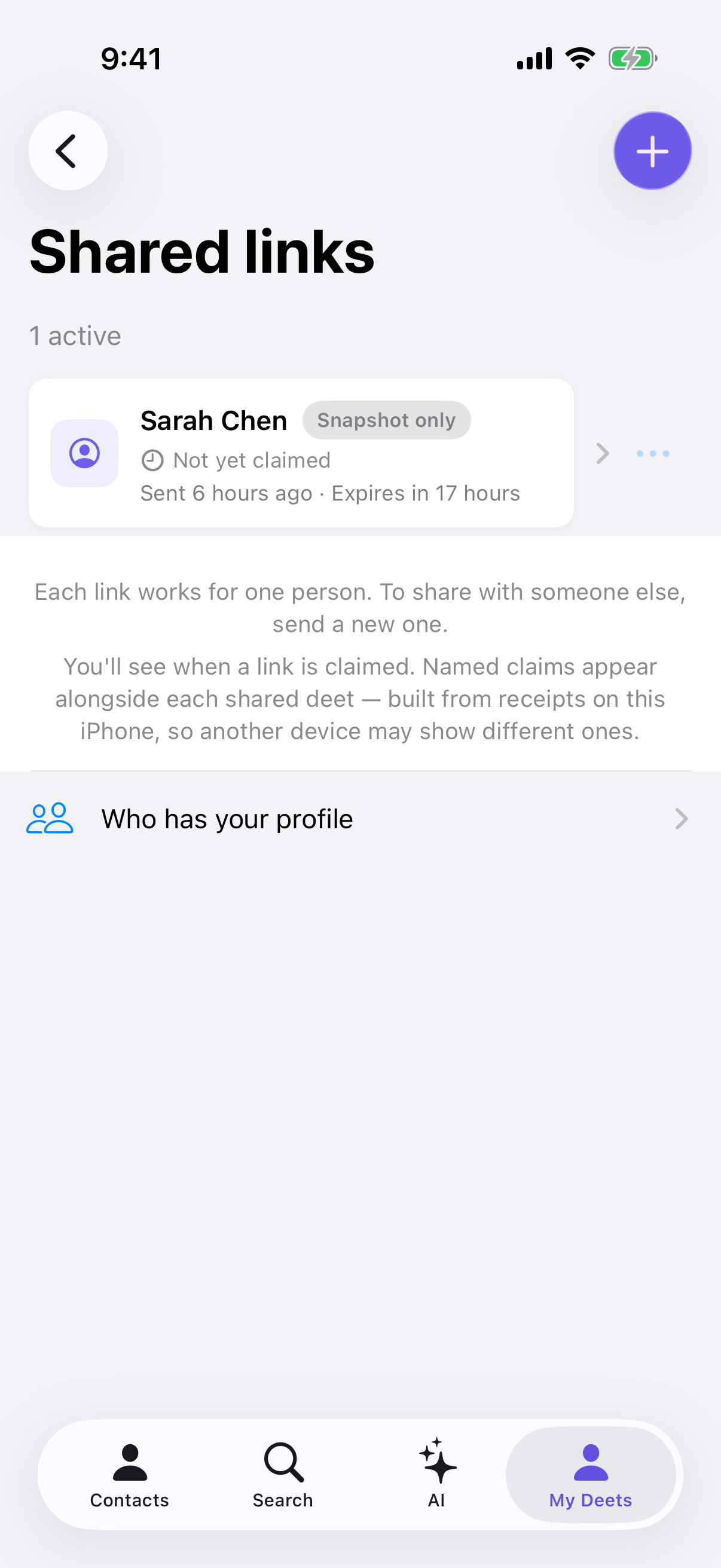
Each entry shows what you sent, when you sent it and when it expires. Links stay here only until someone claims them. A claimed link leaves the list, and the person who accepted it appears in Who has your profile.
Reading a row
Each share carries a chip saying what kind it is:
|
Chip |
Meaning |
|---|---|
|
Live |
Once accepted, your changes will keep reaching this person |
|
Snapshot only |
A fixed copy — it won't update |
|
Expired |
The link no longer works |
Live shares work on every plan. A row says Snapshot only when that share went as a fixed copy: its set is set to Never, you turned Keep updated off, you were at your live-card limit, or it's someone else's contact. See Sending a card that stays up to date.
What you can do with each share
-
Copy link — get the link again, to send it yourself
-
Re-send — opens your phone's share sheet with the same link
-
Revoke — stop it working. See Revoking a share
-
Re-share to enable live updates — on a Snapshot only share of your own card, this starts a new share so you can send a live one
Tap ••• on a row for these, or swipe left for Revoke and Re-send. Tapping the row shows the details in that share.
Re-send sends the same link, not a new one. That matters: it keeps one thing to revoke, and it doesn't reset the 24-hour clock — the expiry still runs from when you first sent it.
Who actually accepted
The list above is links nobody has claimed yet. To see the people who accepted one — and to stop any of them individually — tap Who has your profile, below the list. It works on every plan. See Who has your profile.
Keeping current
The list refreshes itself about every 30 seconds while it's open. When someone claims a link, it drops off — look for them in Who has your profile.
Troubleshooting
The list is empty. You haven't shared anything yet, or everything you sent has been claimed or has expired. People who accepted are in Who has your profile — there's a link to it on the empty screen.
A share I sent isn't listed. It's been claimed (check Who has your profile), or it's over 24 hours old and has expired. If it's recent and in neither place, check you were signed in to the same account when you sent it.
I can't tell which link went to whom. Deeta records what you sent and when, but not who you sent it to — it doesn't watch your Messages or Mail. Use the timestamp to work it out, and if you're unsure, revoke and send a fresh one.
I revoked something by accident. Revoking can't be undone. Send a new share to the same person.
A share says "Snapshot only" but I wanted it live. It went as a fixed copy — see Reading a row. Tap ••• → Re-share to enable live updates to send a live one.
Questions
How long do shares stay in the list? Until someone claims them, or until they expire after 24 hours, whichever comes first. See How long share links last.
Does the list show who accepted? No. A claimed link leaves the list. The people who accepted your shares are in Who has your profile.
Does revoking take back what they saved? Revoking works on links nobody has claimed yet. To take your details back from someone who accepted, use Who has your profile. See Revoking a share.
Can I see this on another device? The links themselves are kept with your account, so yes. Copy link and Re-send only work on the phone you sent from; elsewhere Deeta says the link isn't available on this device. Revoking works from any device. The list of people who accepted is built on each device separately, so a second device may show fewer.