

When you share your card, it goes as a snapshot or a live card. A live card keeps itself current on the other person's phone — change your number later, and their copy changes too.
Every plan can send live cards. Free and Plus have a limit on how many you can have out at once; Pro and Power don't (see How many live cards you can send, below). Receiving them is free and unlimited on every plan.
Turning it on when you share
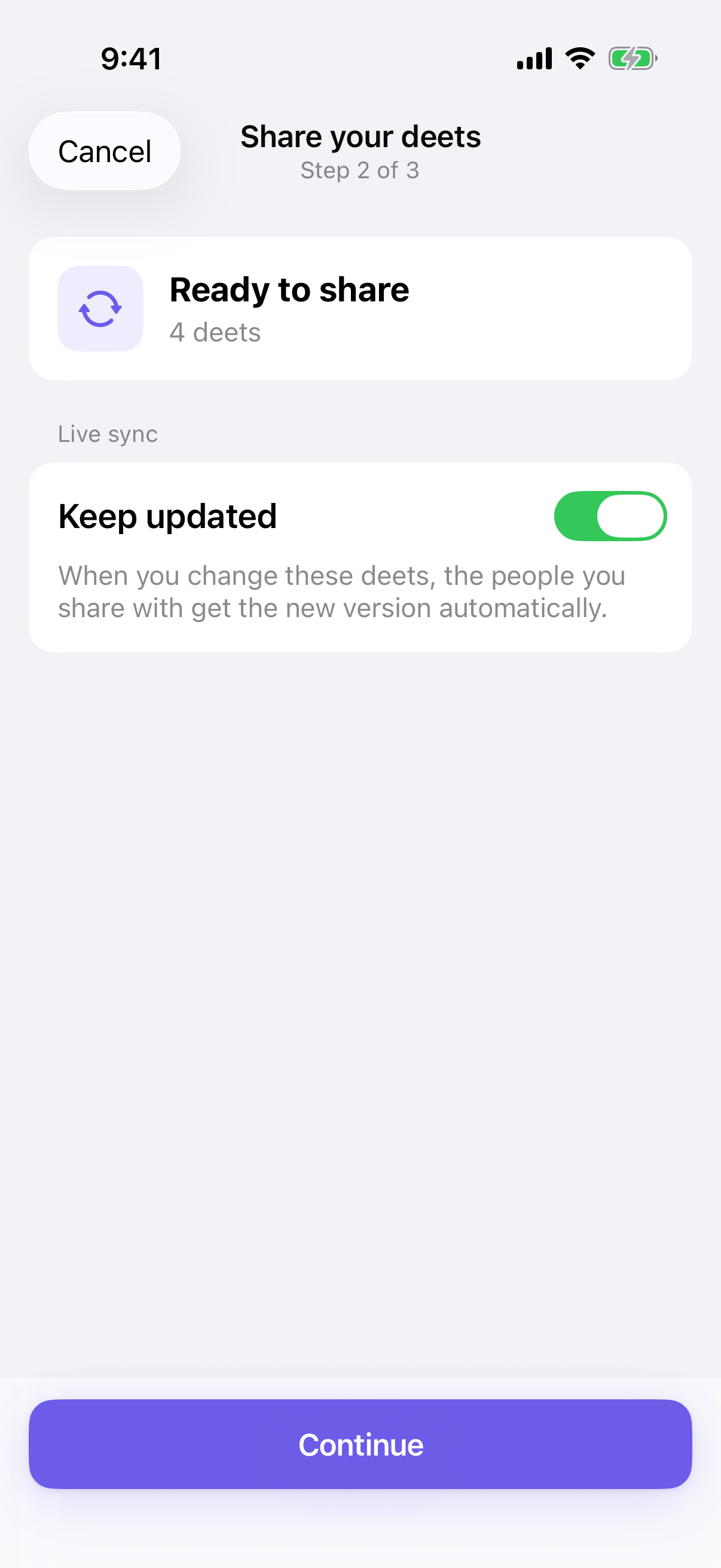
It's the middle step of sharing your card.
-
Open My Deets and tap Share my deets.
-
Pick the set you want to send.
-
On the Ready to share step, you'll see a Live sync section. For an Ask me set there's a Keep updated toggle — leave it on.
-
Choose how to send it, and send.
That's it. From then on, when you edit a detail in that set, the people who accepted a live card get the new value.
What reaches them afterwards
-
Changes. Edit a detail and their copy updates.
-
New details. Add something to a set you've already shared live and it reaches them too — including anything you file underneath it. You don't need to re-send the card.
-
Deletions. Delete a detail and the removal travels: once their phone receives it, Deeta takes it out of the copy your share gave them and tells them what was removed. It can't remove a copy they made some other way.
Taking a detail back out of a live card
Changing your mind reaches them too, and what happens depends on how you do it.
|
What you do |
What happens to their copy |
|---|---|
|
Take a detail out of a set you've shared live |
They keep what they already have, and it stops updating from then on |
|
Delete a whole set you've shared live |
Same — the details stay with them, frozen |
|
Mark a detail Never |
It's removed from the copy your share gave them, along with anything filed under it |
So there are two different intentions and Deeta treats them differently: taking something out of a set stops it changing, while marking it Never takes it back.
If a detail sits in more than one set and you've shared both, it keeps updating for anyone whose card still carries it through the other set.
⚠️ This only reaches people who accepted your card. A link nobody has claimed yet carries whatever it carried when you sent it — revoke it in Settings → Shared links if you don't want it opened.
Why the toggle sometimes isn't there
Each of your sets carries its own default, so the step adapts:
|
The set's setting |
What you see |
|---|---|
|
Always |
No toggle — it's already a live card, and the step confirms it |
|
Ask me |
The Keep updated toggle, switched on. Turn it off for a one-off snapshot |
|
Never |
No toggle — this set always sends as a snapshot |
|
You've used all your live cards (Free or Plus) |
No toggle. The step says this one goes as a snapshot, with See plans |
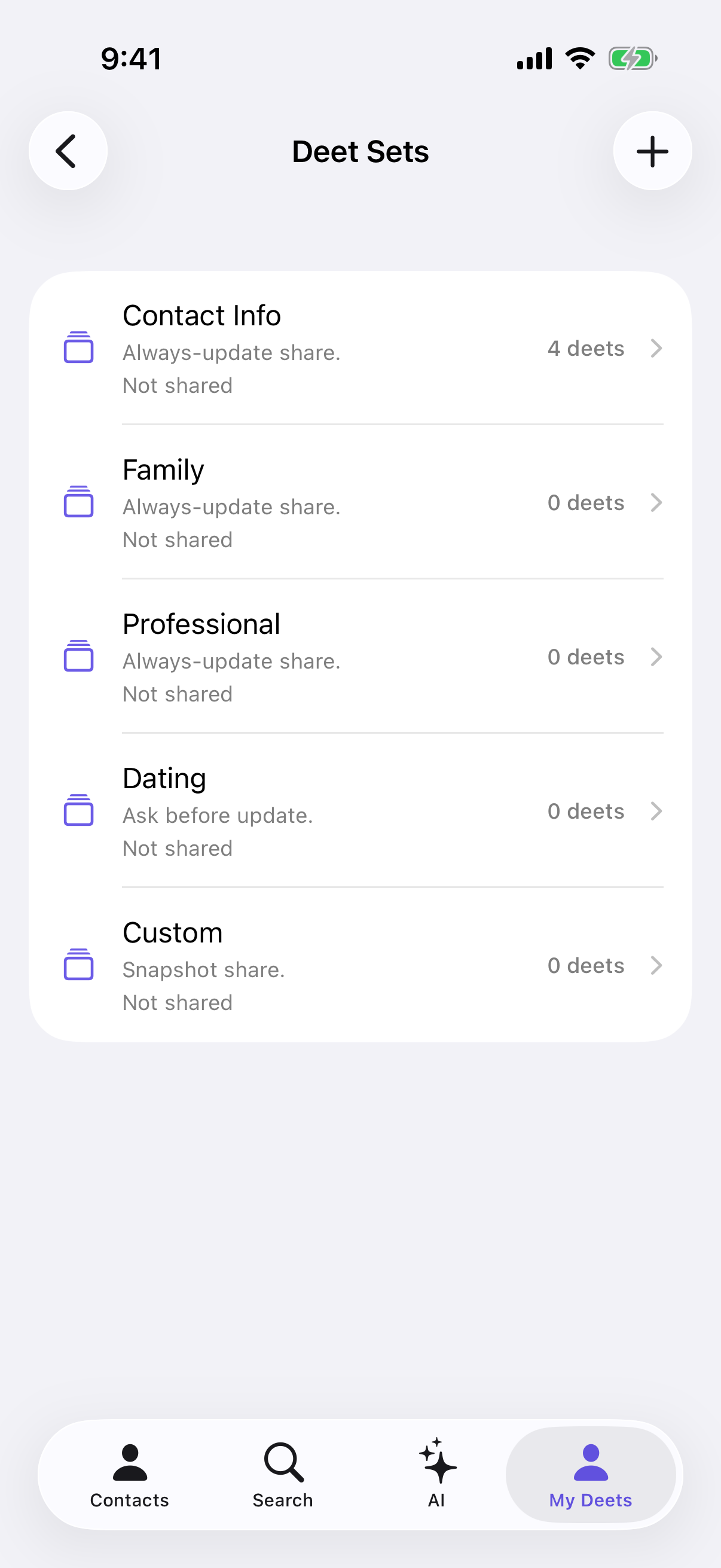
You set this per set in Settings → Deet Sets. Open a set, and use When shared, sync updates? — Always, Ask me, or Never. The set list shows which is which: Always-update share, Ask before update, or Snapshot share.
⚠️ That setting decides how new shares go out. Changing it doesn't reach cards you've already sent — for those, use the table above.
How many live cards you can send
|
Plan |
Live at once |
|---|---|
|
Free |
5 |
|
Plus |
15 |
|
Pro, Power |
No limit |
Each live link you send counts once, whether it's still waiting or someone has accepted it. A share that carries several sets still counts as one. Snapshots never count, and neither do cards you receive.
See where you are in Settings → Usage, under Live shares: how many are claimed (accepted) and how many are waiting (sent, not accepted yet). Pro and Power don't show this row.
You get a live card back when you stop updating or take back someone in Who has your profile, when you revoke a link nobody has accepted in Settings → Shared links, or when an unaccepted link expires.
When you've used them all
Your card still sends, as a snapshot. The Ready to share step tells you before you send: This one goes as a snapshot — it sends everything you have now, and won't update afterwards. It also names the limit you've reached and offers See plans. Upgrading lifts the limit for new shares straight away. A card that already went as a snapshot stays one.
Sharing more than one set
If you pick several sets and they disagree — one set to Always, another to Never — the step lists each set and whether it will stay up to date or go as a snapshot. Nothing's wrong: each set keeps its own setting. Tap Continue. See Sharing more than one set at once.
Troubleshooting
I turned it on but they say nothing updates. They have to accept the card first, and then choose how your updates reach them. If they set you to Ask, your changes wait for them to review rather than landing straight away. That's their choice to make, not yours.
I added a new detail and they didn't get it. Check it's actually inside the set you shared — or filed under something that is. Details outside that set aren't part of the card.
I took a detail out of the set and they still have it. That's intended. Taking it out stops it updating; it doesn't reach back and remove it. If you want it gone from their copy, mark it Never instead.
I don't want this set to ever update. Set it to Never in Settings → Deet Sets. Every new share from that set is a snapshot, and the toggle stops appearing. Cards you've already sent aren't affected by that setting.
I changed a detail and nothing seems to have happened. Open Settings → Shared links → Who has your profile. Anyone listed with a ••• button is still getting your updates; a row without one has stopped. Links nobody has accepted yet stay on Shared links: Live means it will keep updating once accepted, Snapshot only means it won't. If a share you meant to be live shows Snapshot only, you'd probably used all your live cards when you sent it.
The step said this one goes as a snapshot. You've used all your live cards for your plan. The card still sent, with everything you have now — it just won't update. Free up a live card (see above), or tap See plans.
My subscription ended. Live cards you'd already sent keep updating. Nothing pauses. New shares go live only while you're under your plan's limit; past it, they go as snapshots. See If your plan changes.
Questions
Do they have to accept? Yes. They accept your card as normal, and then they control how — or whether — your later changes reach them.
Can I send live to one person and a snapshot to another? Yes. It's chosen per share, so use the toggle each time.
What if I delete a detail? The removal travels too. It's taken out of their copy in Deeta, and they're told what was removed.
What if I just take it out of the set? They keep it, and it stops updating. That's the difference between the two: removing from a set freezes, Never takes back.
Can I stop it later? Yes, per person or per set, at any time, on every plan. See Who has your profile.