

Removing someone is deliberate — Deeta always asks whether you mean just Deeta, or your phone as well.
Deleting from a contact page
-
Open them and scroll to the bottom.
-
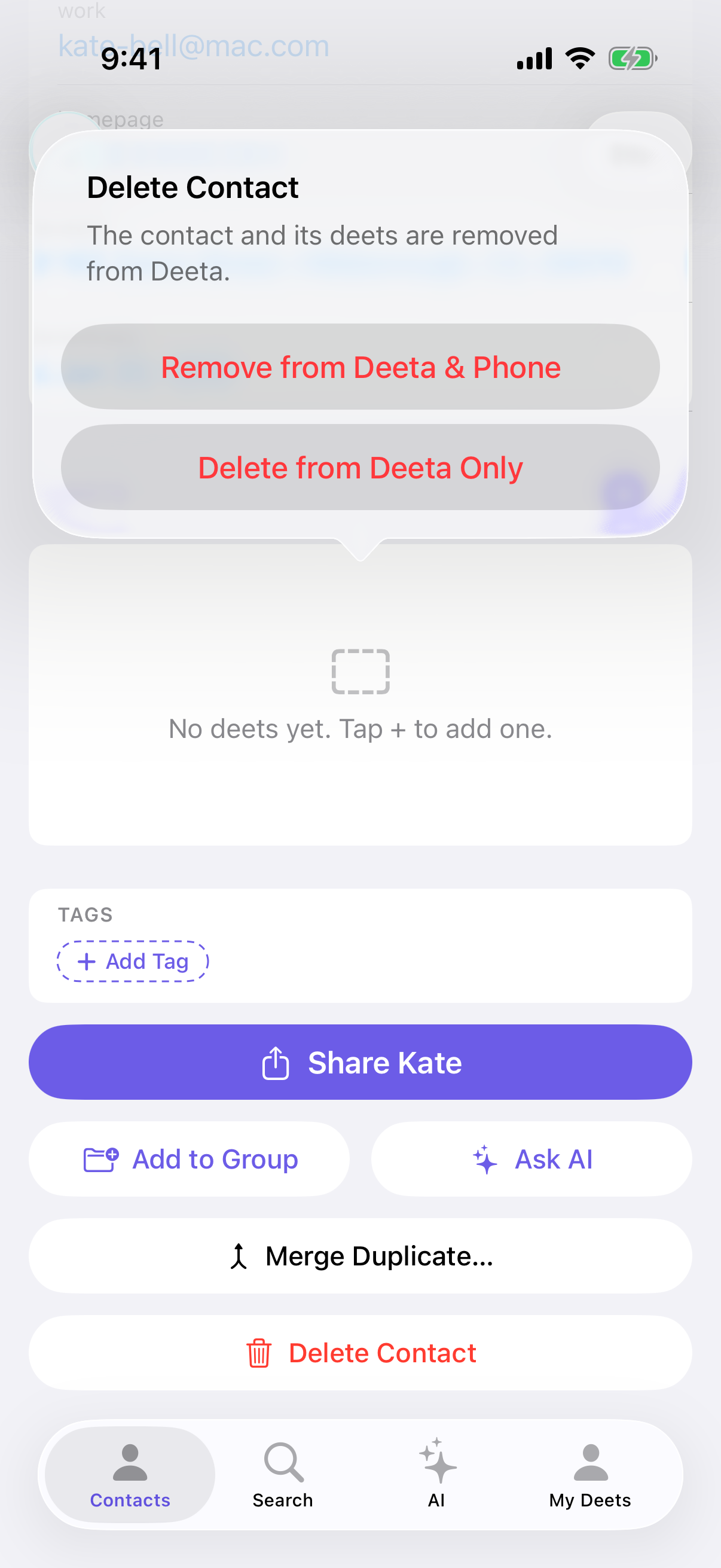
Tap Delete Contact.
-
Choose:
-
Remove from Deeta & Phone — removes them from Deeta and your iPhone's Contacts app. Deeta asks you to confirm again (Remove from Phone) before it touches your phone.
-
Delete from Deeta Only — removes them here; they stay in your iPhone's Contacts app.
-
"Remove from Deeta & Phone" only appears if they're in your phone's contacts. Someone who only ever existed in Deeta shows one option.
Please read before "Remove from Deeta & Phone"
It cannot be undone. Deleting from your iPhone's Contacts app is permanent, and Deeta cannot put them back.
If you're unsure, choose Delete from Deeta Only. They stay in your iPhone's Contacts app. But once someone is deleted from Deeta, later syncs leave them out, so Deeta won't bring them back on its own.
When someone is deleted on your phone
Deeta doesn't quietly follow suit. If a contact disappears from your iPhone's Contacts app, Deeta puts it in a queue and asks you:
-
Remove — accept the deletion.
-
Keep in Deeta — keep them here, no longer linked to your phone.
With two or more waiting, Remove All and Keep All handle them in one go.
You'll find it at Settings → Organisation → Deletion Queue.
A red dot marks the way to it. It appears on the settings gear on My Deets, and again on the Deletion Queue row inside Settings, so you can follow it to the thing that's waiting. Clearing the queue clears the dot.
The second option exists because your deets aren't in your phone's contacts. Deleting someone there shouldn't destroy years of notes you kept here — so Deeta asks instead of assuming.
Troubleshooting
There's a red dot on my settings gear and I can't find what it wants. It's the deletion queue. Open Settings → Organisation → Deletion Queue — the row carries the same dot — and deal with whatever is waiting. The dot goes when the queue is empty.
I only see one option. They're not in your phone's contacts, so there's nothing to remove there.
I deleted them and the deets are gone. Deets belong to the contact, so they go with it. If you kept them in Deeta from the queue, the deets are intact.
"Couldn't remove this contact from your phone." Deeta needs full Contacts access. Check Settings → Deeta → Contacts on your iPhone, then try again. If Deeta doesn't have full access, its own Settings shows a warning at the top — tap it to grant access.
I deleted someone from Deeta and they're still on my phone. That's what Delete from Deeta Only does. Deeta won't re-add them. To remove them from your phone as well, delete them in your iPhone's Contacts app.
Something's in my deletion queue I don't recognise. It was deleted on your phone, possibly from another device signed in to the same account. If unsure, choose Keep in Deeta — the safe option.
Questions
Can I undo? No. After Delete from Deeta Only they're still in your iPhone's Contacts app, but their deets are gone and Deeta won't re-import them. Remove from Deeta & Phone removes them everywhere.
Does deleting remove them from groups and tags? Yes, along with the contact.
Does deleting a contact affect anything I shared? No. To stop a share, revoke it — see Revoking a share.
What if they were sending me live updates? Deleting the contact removes your copy. To stop receiving from someone without deleting them, use Settings → Live updates — see Reviewing an update someone sent you.
Can I delete several at once? Not currently. One at a time, from their page.