

Rather than adding details one at a time, say or paste a whole note and let Deeta pull the pieces out.
How it works
-
Open a contact, tap + in the DEETS section.
-
On the capture card at the top, choose Voice or Text.
-
Say or paste something natural — for example: "Met Sarah at the conference. She's at Figma now as a senior designer, two kids — Noah and Emma — and she's really into bouldering."
-
Deeta shows you a Review deets screen with what it found — Company, Job title, Kids, Hobby.
-
Everything arrives ready to save, each row marked Adding. Tap the ✕ on anything you don't want; tap + Add to put it back.
-
Tap Save 4 deets.
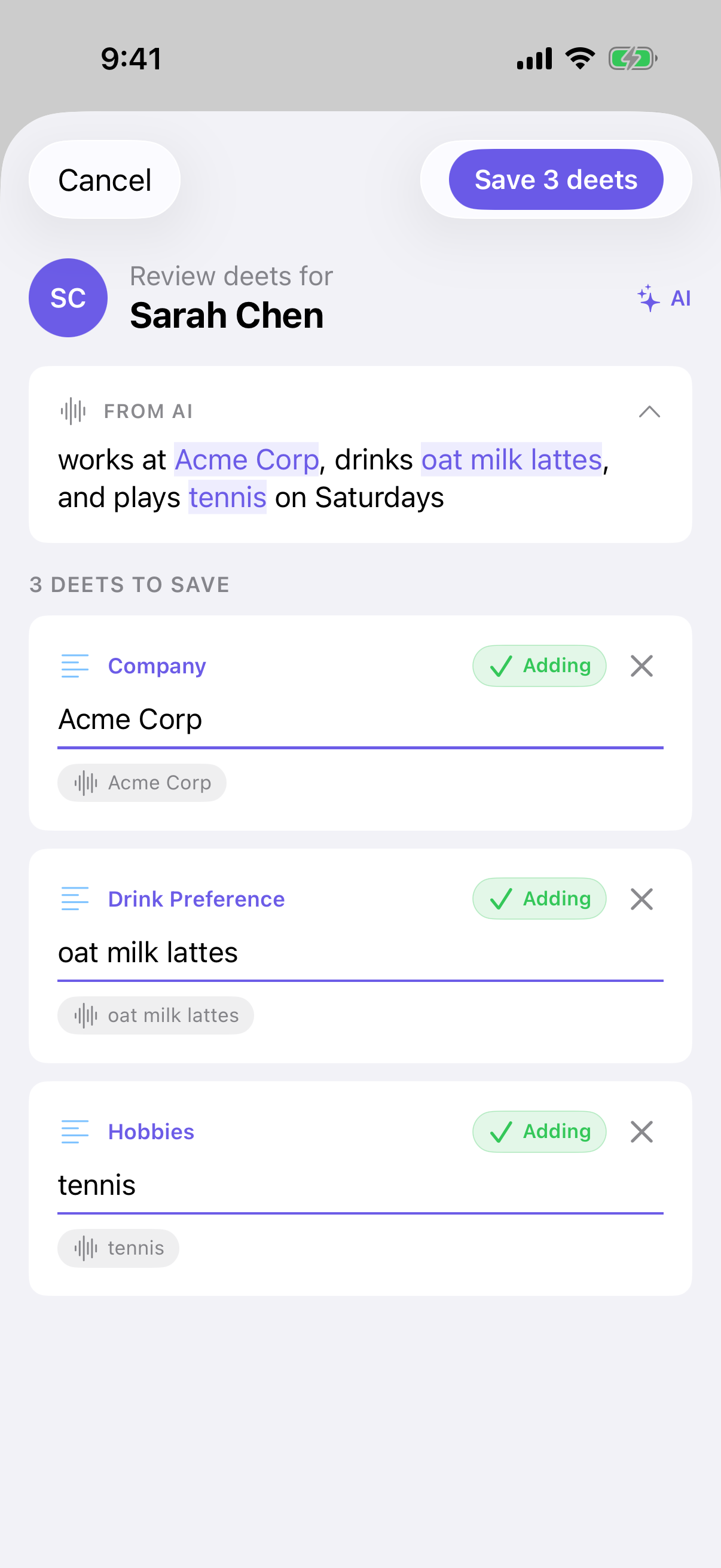
Nothing is saved until you tap Save. Every suggestion is yours to accept, change or drop, and you're taken to the contact afterwards so you can see what landed.
Low confidence
Where Deeta is less sure about something, the row is marked Low confidence and shown expanded, so the thing most likely to be wrong is the thing you look at hardest.
Rows that were shortened to fit say so — "Value was shortened to fit (280 chars)."
A row marked as a date (the calendar icon) is saved in a form Deeta can set a reminder from: 3-6-2019 is saved as 6 March 2019. Rows Deeta already reads as a date are saved exactly as shown.
Where else you can use it
-
From the AI tab — "Make a deet for Sarah" and dictate.
-
From other apps — share text into Deeta and pick who it's about.
Where the text goes
Deeta tries to do this on your phone first, and there are two things that can do it:
-
The enhanced on-device model, if you're on Power and have downloaded it. Deeta prefers this one — it's the more capable of the two.
-
Apple's built-in intelligence, on an iPhone that supports it.
When either handles it, nothing leaves your phone.
If neither can — or if an attempt on your phone doesn't work out — the text is sent to be analysed and then discarded. It is never stored, and neither is what comes back.
The exception is Private Mode. If you've chosen it in Settings → AI Provider, your text never leaves your phone. When your iPhone can't do the analysis, Deeta tells you so instead of sending it.
Your voice audio never leaves your iPhone, in any of these cases. What you said is turned into text on the device first, and only text is ever sent.
If you'd rather this always stayed local, choose Private Mode. See Choosing how your questions are answered.
Captures on the free plan
Free includes 10 captures a month. Typing deets by hand is always unlimited. Settings → Usage shows where you stand.
Troubleshooting
"I couldn't find any details in that." The text didn't contain anything Deeta could turn into a deet. Try being more specific — "her coffee order is an oat flat white" works better than "we had coffee".
It got something wrong. Edit it on the review screen before saving. That screen exists precisely because this isn't perfect.
"We couldn't match these to a contact — remove them to continue." Deeta found details it can't attribute to anyone. Remove those rows with ✕, or tap Choose a contact for these deets to assign them yourself.
"Smart capture isn't ready on this device right now." You've chosen Private Mode and your iPhone couldn't do the analysis this time, so Deeta didn't send your text anywhere. Try again later, add the deets by hand, or choose a cloud provider in Settings → AI Provider.
"Smart capture isn't available in your region yet." Capture can't be used where you are right now. Adding deets by hand always works.
"Smart capture isn't available right now" or "…is temporarily unavailable." Try again later. Adding deets by hand always works.
I've run out of captures. Free includes 10 a month. The count resets each cycle — Settings → Usage shows the date — or upgrade for more.
I removed everything and it still counted. It does — the analysis ran. Worth knowing if you're near your monthly limit.
It worked offline yesterday and needed a connection today. Whether it can run on your phone depends on what's available at that moment. If the on-device attempt can't run or doesn't succeed, Deeta uses the connection instead — and needs one. With Private Mode chosen it never uses a connection; it shows the message above instead.
Questions
Is it accurate? Good with clear, factual sentences. Less good with ambiguity or unusual names. That's why you review first.
Can I paste from another app? Yes — use Text and paste.
Does it work offline? Only when your iPhone can do the analysis itself. Otherwise it needs a connection.
Is any of this kept? No. What you dictate or paste is used to make the suggestions and then discarded.
What if a note mentions several people? Deeta groups the suggestions by person, with a heading over each group. Check the heading before saving.